The Problem We Kept Running Into
Our sister company, Tricon Solutions, is an IT staffing and consulting firm. Their consultants are placed at client sites across the country. Every week, each consultant logs their hours, their client manager approves (or rejects) the timesheet, and that approved record becomes the basis for billing and payroll. This is the operational backbone of any staffing business — and we had a front-row seat to how badly the available tools handle it.
The workflow itself is simple: consultant submits, client approves, signed document goes to billing. But the tools available to manage this workflow fall into two categories, and neither works.
Enterprise systems like Workday, ADP, and SAP SuccessFactors are designed for large corporations managing internal employees. They come with six-month implementations, per-seat licensing, complex configurations, and dozens of modules you'll never touch. For a staffing firm with 50–200 consultants, these systems are overengineered, overpriced, and fundamentally designed for a different use case. The approval workflow assumes an internal HR department, not a client manager at a third-party company who needs to approve a timesheet with one click.
Spreadsheets and email chains are what most small and mid-size staffing firms actually use. A consultant fills out an Excel template, emails it to their client manager, the manager replies with approval, someone at the staffing firm downloads the attachment, matches it to the right project, and files it for billing. It works until it doesn't — missed emails, wrong versions, unsigned documents, no audit trail.
We needed something in between: purpose-built for the staffing workflow, lightweight enough to deploy in days, and robust enough to produce billable records that stand up to audit.
What We Built
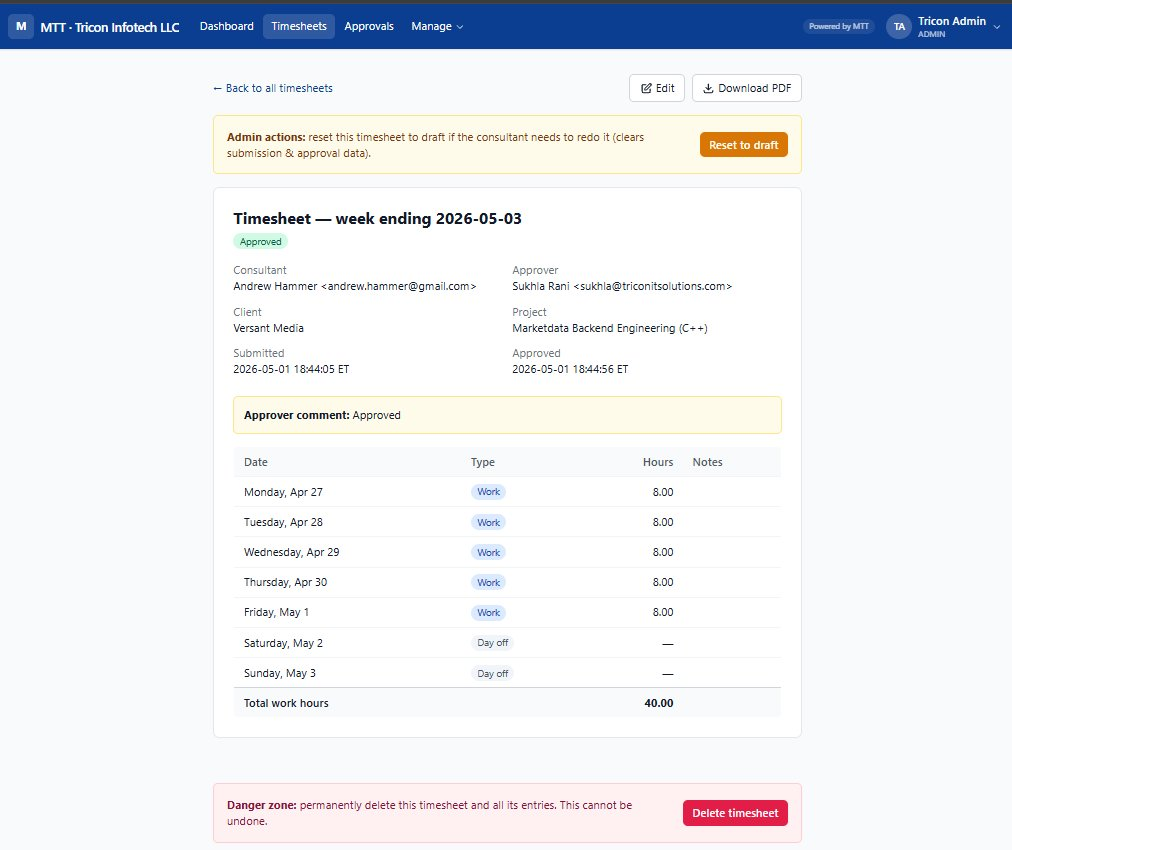
MTT (My Time Tracker) is a self-hosted web application designed specifically for the IT staffing timesheet workflow. The core loop is intentionally narrow:
- Consultant logs into MTT, opens the current week, enters hours by day (with support for PTO, holiday, sick, and unpaid leave), and submits.
- Approver (the client manager) receives an email notification, logs in, reviews the submission, and approves or rejects with a comment.
- On approval, the system automatically generates a digitally signed PDF timesheet and emails it to the consultant, the approver, and the company's billing inbox — with the PDF attached.
- Admin (Tricon staff) manages users, clients, projects, and assignments. Exports approved timesheets to CSV for payroll integration.
That's it. No project management module. No resource planning. No AI-powered forecasting dashboard. Just the workflow that staffing firms actually run every week, executed cleanly.
Design Decisions That Matter
Three Roles, No More
Every feature in MTT maps to one of three roles: Admin, Consultant, or Approver. We deliberately avoided the role explosion that plagues enterprise tools. The Admin manages the system. The Consultant enters time. The Approver signs off. Clean separation, no role-based confusion, no permission matrices.
PDF as the Signed Record
In staffing, the approved timesheet is a legal document — it's the basis for client invoicing and consultant payroll. We generate a branded PDF for every approved timesheet, with a digital approval disclaimer baked in: "Approval recorded digitally — no signature required." This PDF is automatically attached to the approval email and delivered to the company's billing inbox. No manual download, no chasing signatures.
Multi-Tenant from Day One
We designed MTT's branding layer to be fully configurable through environment variables. Three variables control the entire identity:
APP_NAME— the product name (defaults to "MTT")BRAND_TAGLINE— the tenant-specific expansion ("My Tricon Time" for us, "My Time Tracker" for external deployments)COMPANY_NAME— the operating entity
Every touchpoint — login page, navbar, PDF header, email subject lines, footer — renders from these variables. A new staffing firm can deploy their own branded instance without touching a line of code.
Self-Hosted, Full Data Ownership
Staffing firms handle sensitive employment data. MTT runs on your infrastructure (we deploy on Render, but it'll run anywhere that hosts Node.js and Postgres). No third-party SaaS has access to your consultant data, client relationships, or billing records. You own the database. You own the backups.
Technical Architecture
We chose a deliberately conventional stack. No framework churn, no build pipeline complexity, no deployment surprises. Node.js and Express give us a mature, well-understood server runtime. PostgreSQL provides a proper relational database with ACID guarantees — critical when you're generating billable records. EJS templates with Tailwind via CDN keep the front end simple and responsive without a client-side framework.
Database Design
The schema is deliberately normalized and straightforward: Users, Clients, Projects, Assignments, Timesheets, and Time Entries. Assignments link a consultant to a project and an approver — this is the structural backbone that enforces who can submit time against what, and who has authority to approve it.
The schema is idempotent and applied on every application boot. This means the database structure is always in sync with the codebase, and new deployments or restarts never require manual migration steps. We use PostgreSQL's CITEXT extension for case-insensitive email uniqueness and TIMESTAMPTZ for all temporal data to ensure timezone correctness at the storage layer.
Email as a First-Class Workflow Component
Transactional email isn't an afterthought in MTT — it's load-bearing. The system sends structured, branded HTML emails at every state transition: submission notification to the approver, approval/rejection notification to the consultant, and a copy with the approved PDF attached to the company billing inbox. Email subjects are prefixed with [MTT] for automatic inbox filtering. The email templates follow a minimalist transactional style — clean, single-column layouts with a brand-colored CTA button. We use Nodemailer with SMTP, which means MTT works with any email provider: Resend, Gmail, Microsoft 365, or your own mail server.
PDF Generation
Every approved timesheet produces a branded, status-themed PDF using PDFKit. The PDF includes the consultant's daily entries, total hours with a brand-blue banner, approver comments in a status-colored box, and a footer with a digital approval disclaimer. Two rendering paths share a single drawing routine: one streams directly to an HTTP response for download, the other buffers to memory for email attachment. The PDF is designed to fit on a single page — margins and footer positioning are calibrated to prevent overflow.
Automated Scheduling
MTT includes a built-in cron system for operational nudges: Friday reminders for consultants who haven't submitted, and Monday/Thursday reminders for approvers with pending timesheets. These can be enabled via environment variable or triggered on-demand through HTTP endpoints — giving operations teams flexibility without requiring code changes.
How We Built It: Claude-Integrated Development
We used Anthropic's Claude as our primary development partner across the entire lifecycle. This wasn't an experiment in AI-assisted coding — it was a deliberate methodology choice that reflects how we approach client engagements.
Architecture and Schema Design
We started with the workflow requirements and used Claude to design the data model, evaluate trade-offs (normalized vs. denormalized time entries, assignment-scoped vs. user-scoped timesheets), and produce the idempotent schema. The schema went through multiple iterations as we refined the approval workflow and added support for different day types (PTO, holiday, sick, unpaid).
Iterative Build Cycle
Development followed a tight loop: define the feature, implement with Claude, test locally, identify edge cases, fix, and move on. Each feature — from the admin CRUD to the PDF generator to the email templates — was built, reviewed, and refined in this cycle. Claude handled everything from Express route handlers and EJS template logic to PDFKit coordinate math and Nodemailer configuration.
Bug Discovery and Resolution
The most valuable part of working with Claude wasn't the initial code generation — it was the debugging cycle. When we discovered that the submit handler was skipping data persistence before status transition (causing approvers to see stale hours), Claude traced the issue through the route handler, identified the missing saveEntriesFromForm call, and fixed it. When UTC date parsing was shifting dates backward in Eastern time, Claude implemented a safe parseISO utility that we now use throughout the codebase. These are the kinds of subtle, production-critical bugs that surface only under real usage.
Production Hardening
Before deployment, we worked through security (Helmet configuration, secure session cookies, bcrypt password hashing, forced password change on first login), operational concerns (health check endpoint, structured logging, graceful startup with async schema application), and deployment configuration (Render Blueprint with render.yaml, environment variable management, SSL termination, trust proxy settings for secure cookies behind a reverse proxy).
Deployment and Operations
MTT runs on Render.com using a Blueprint deployment model. The entire infrastructure is defined in a single render.yaml file: an always-on web service and a managed PostgreSQL 18 database. Push to main triggers automatic deployment. The custom domain mtt.triconit.com is configured with CNAME records, and Render handles TLS termination automatically.
We dogfooded MTT with Tricon Solutions' consultants before considering any external marketing. Real users, real timesheets, real approvals, real PDFs going to real billing inboxes. The issues that surfaced during this pilot — timezone display inconsistencies, PDF formatting edge cases, email deliverability tuning — are exactly the kind of production polish you only discover with real operational use.
What's Next
MTT solves the core workflow well. The roadmap is driven by operational feedback from our own use and early conversations with other staffing firms:
- Payroll integration — direct feeds to common payroll platforms, beyond CSV export
- Client portal — a streamlined view for client managers that doesn't require login credentials
- Mobile-optimized entry — consultants increasingly submit from their phones
- White-label marketplace — packaged deployment for staffing firms who want their own branded instance
If you run a staffing firm and you're tired of chasing timesheets through email, we built MTT for exactly your problem. And if you're an enterprise looking at what AI-driven development can deliver — this is a working example of our methodology in production.
See MTT in Action
Purpose-built timesheet management for IT staffing firms. No enterprise bloat. No per-seat licensing.
Visit MTT →